Getting started
Install PgCraft on Linux as a portable AppImage and connect to your first PostgreSQL database.
PgCraft is a fast, native desktop GUI for PostgreSQL. This guide gets you from download to your first connection in a couple of minutes. PgCraft runs on Linux, macOS, and Windows — all free, with no account and nothing extra to install.
Install
Grab the build for your operating system from the download page, then follow the steps for your platform below.
Linux
PgCraft ships as a single portable AppImage — no installation, runs on most distributions. Make it executable and run it:
chmod +x PgCraft-*-x86_64.AppImage
./PgCraft-*-x86_64.AppImage
No extra dependencies: the AppImage bundles everything PgCraft needs — nothing to install.
macOS
Download the universal disk image (.dmg) — one build for both Apple silicon and Intel Macs. Open it, then drag PgCraft into your Applications folder and launch it from there.
Windows
Download the installer (.exe) and run it. The guided installer sets PgCraft up and adds a Start-menu shortcut.
Connect to a database
On first run, PgCraft opens the connection manager. Add a connection and fill in the standard PostgreSQL details:
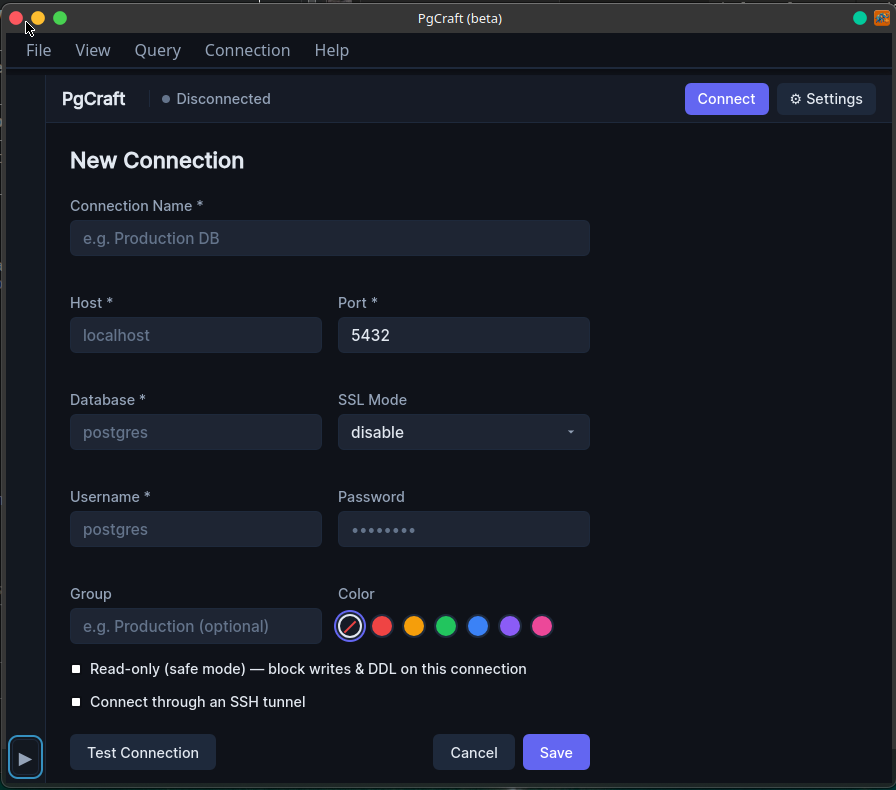
| Field | Notes |
|---|---|
| Name | A label for this connection (e.g. “Production DB”). |
| Host | Server hostname or IP — localhost for a local database. |
| Port | PostgreSQL port; defaults to 5432. |
| Database | The database to open. |
| Username | The PostgreSQL role to connect as. |
| Password | Optional; stored in your OS keyring, never in plain text. |
| SSL mode | disable, allow, prefer, require, verify-ca, or verify-full. |
PgCraft connects to PostgreSQL 12 and newer.
SSH tunnels & SSL certificates
For databases behind a bastion, enable SSH tunneling and provide the SSH host, port, user, and either a password or a private key (with an optional passphrase). For mutual TLS, add your CA, client certificate, and client key under the SSL options. Both are free.
Test, then connect
Use Test connection to verify everything before saving. Passwords and key passphrases are stored securely in your OS keyring (libsecret on Linux), with an encrypted file fallback.
Working against production? Turn on read-only safe-mode for a connection to block accidental writes and DDL — a clear badge shows when it’s active.
Next: see what PgCraft can do in the features overview, or learn the keyboard shortcuts.